


Managing structured data manually may be possible when a Shopify store has only a few products. Once the catalog grows, product prices change, stock levels move, new reviews arrive, and new pages are published regularly. Updating the same markup page by page quickly becomes repetitive SEO work.
A structured markup generator automates much of this process. It creates structured data for eligible pages and updates it as store information changes. The setup still needs to be checked carefully because the information in the markup should match what shoppers can see on the page.
What Is Structured Markup?
Structured markup, also called schema markup or structured data, is information added to a page's code in a format search engines can read.
A Shopify product page already displays details such as:
- Product name
- Description
- Price
- Availability
- Brand
- Reviews
- Product variants
Structured data presents these details in a standardized format. Google supports Product structured data for product information, offers, prices, availability, reviews, and variants.
For example, if a product costs $39 and is in stock, the structured data should show the same price and availability. If the markup contains an old price or incorrect stock status, it does not accurately represent the page.
Why Does Schema Markup Matter for Shopify Stores?
Schema markup becomes more useful as a Shopify catalog grows and changes more frequently.
Product Information Changes Regularly
A product may be available today and sold out tomorrow. A sale price may run for one week. New sizes, colors, or other variants may be added later. These changes mean product structured data is not always a set-it-and-forget-it task. Google recommends keeping structured data accurate and consistent with the information visible on the page.
Large Catalogs Create Repetitive Work
Consider a clothing store with:
- 300 products
- Multiple sizes and colors
- Regular price changes
- Customer reviews
- New products added every week
Maintaining the same type of structured data manually across all these pages would take unnecessary time. Automation is more practical when the same technical task must be repeated throughout the catalog.
Product Pages May Be Eligible for Rich Results
Accurate product structured data can make eligible pages suitable for enhanced search appearances containing information such as price, availability, ratings, or reviews. Google decides whether to display a rich result. Adding schema markup does not guarantee one, and it is not a shortcut to higher rankings. Its primary purpose is to describe page content clearly and accurately.
How to Set Up a Structured Markup Generator in Shopify
The SpeedBoostr app includes a Structured Markup Auto Generator inside its SEO Audit section. Follow these steps to configure it.
Step 1: Open SEO Audit
From your Shopify admin, open SpeedBoostr and select SEO Audit. This section contains the structured markup settings.
Step 2: Open the Structured Markup Auto Generator
Find the Structured Markup Auto Generator option.
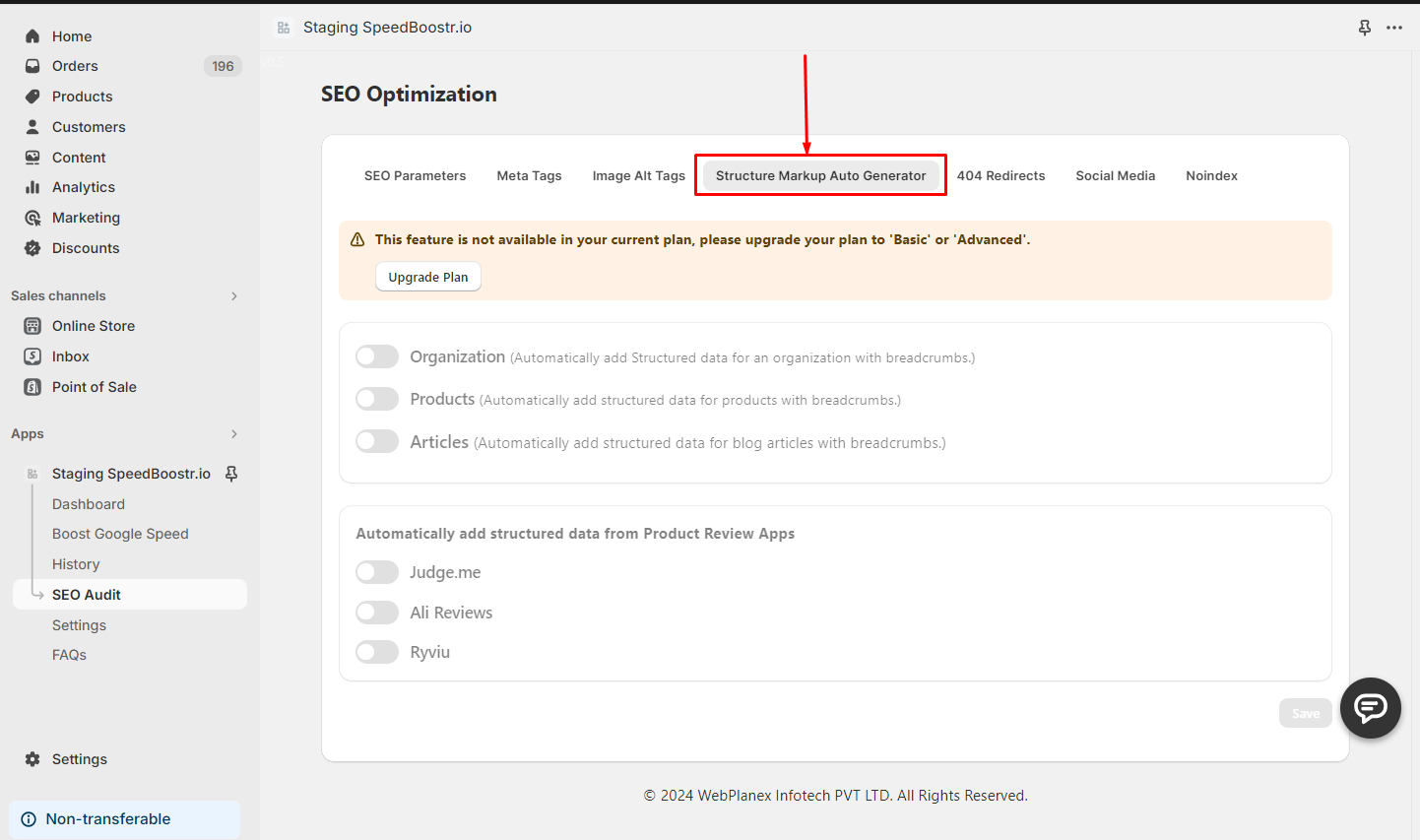
Step 3: Select the Markup Your Store Needs
SpeedBoostr provides three main structured data options:
Organization
Use Organization markup for business details such as your organization name and logo.
Products
Use Product markup on product pages. It generates structured data for details such as the product name, description, price, and availability.
Articles
Use Article markup for eligible blog content. It can include information such as the article title, author, and publication details.
Do not enable every option simply because it is available. Each type of markup should correspond to content that genuinely exists on the relevant page.
Step 4: Connect Your Product Review App
Many Shopify stores display reviews through a separate review app. The structured data should reflect the reviews actually visible on the product page.
SpeedBoostr supports review integration with:
- Judge.me
- Ali Reviews
- Ryviu
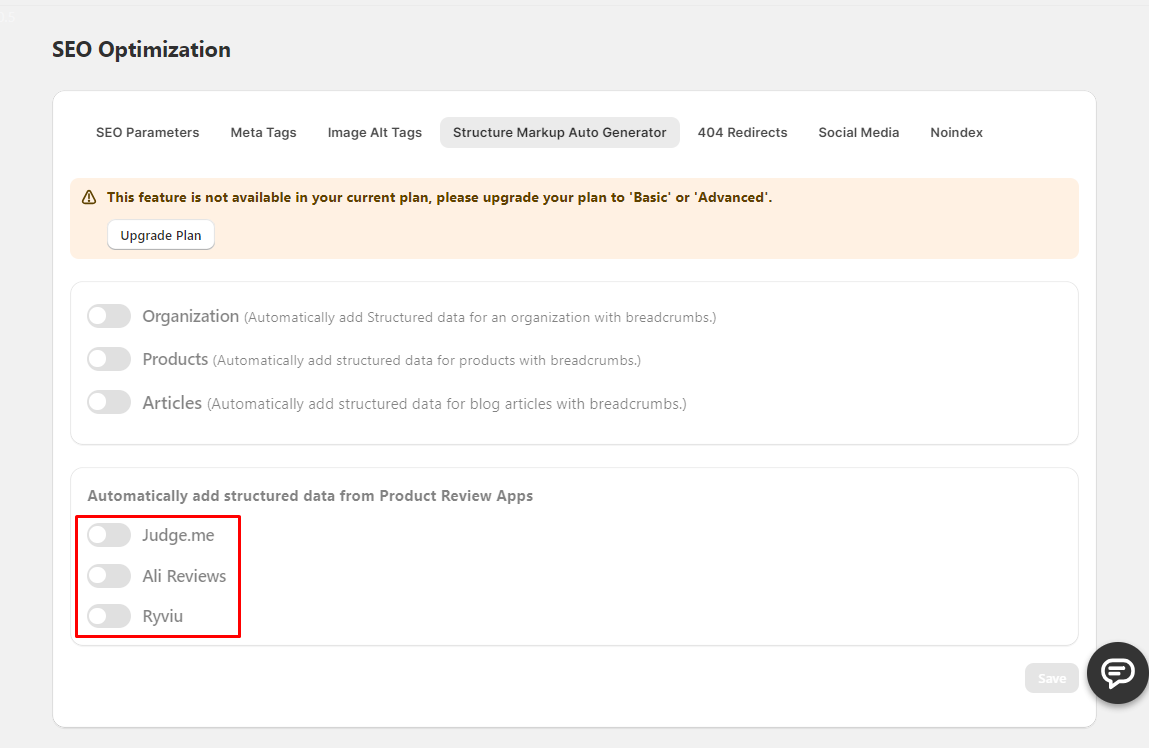
Choose the review app currently used by your store. Do not select a review source that does not match the reviews displayed on your product pages.
Step 5: Activate the Settings
Enable the structured data options your store needs. If your store uses a supported review app, activate the matching review integration. The objective is to automate a repeated technical task while keeping the generated information consistent with the page.
How to Test the Structured Markup
Do not stop after activating the generator. Choose several important URLs and test them with Google's Rich Results Test. Compare the information detected by Google with the information shoppers see on the page.
Check:
- Product name
- Description
- Price
- Currency
- Availability
- Reviews and ratings
- Product variants
- Detected errors or warnings
Test at least one regular product, one discounted product, one sold-out product, and one product with multiple variants if these examples exist in your catalog. Repeat the test after major changes to your theme, product setup, review app, or SEO app. This helps catch issues before they affect many URLs.
Common Structured Data Mistakes to Avoid
Markup Does Not Match the Visible Page
The price, availability, reviews, and other details in the markup should match what customers see.
The Same Schema Is Added More Than Once
A Shopify theme or another app may already generate structured data. Multiple systems can produce duplicate or conflicting markup. Check the page after setup to confirm that the output is clean.
Review Markup Uses the Wrong Source
Connect only the review app used on the storefront. Review data should represent genuine reviews visible to shoppers.
Every Markup Type Is Enabled
Use only the schema types that match the page content. Product schema belongs on product pages, while Article schema belongs on eligible article pages.
The Setup Is Never Tested Again
Theme changes, app changes, and product-template updates can affect structured data. Retest important pages after major store updates.
What Structured Data Cannot Fix
Structured data has a specific technical purpose. It cannot fix:
- Poor product descriptions
- Incorrect product information
- Weak product pages
- Slow page speed
- Poor mobile usability
- Bad internal linking
- Thin or unhelpful content
A Shopify product page still needs to work for the shopper who visits it. Structured data describes the page to search engines, useful content explains the product, and good performance makes the shopping experience easier.
Conclusion
Structured data is manageable when a Shopify store has only a few products. As the catalog grows, manually maintaining product, article, organization, and review markup becomes difficult to justify.
A structured markup generator handles the repetitive work, but the setup still requires sensible choices. Enable only the markup that matches your content, connect the correct review source, keep product information accurate, and test important URLs after implementation.
SpeedBoostr helps Shopify merchants automate structured markup for products, articles, organization details, and supported review apps.
Set up automated structured markup with SpeedBoostr and keep your Shopify SEO easier to manage as your catalog grows.

